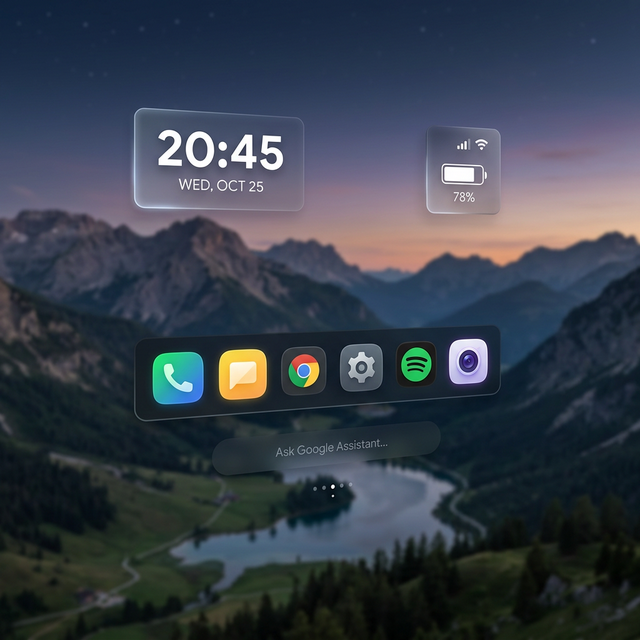
로키드 글래스(Rokid Glasses) 사용자들을 위한 가장 심플하고 직관적인 즐겨찾기 기반 홈 런처를 소개합니다.
* 이 이미지는 가상의 이미지입니다.
로키드 글래스를 처음 접하면 수많은 앱을 설치하게 됩니다. 하지만 정작 자주 쓰는 앱은 5~6개 내외임에도 불구하고, 기본 시스템 UI에서는 원하는 앱을 찾기 위해 여러 번의 조작이 필요했습니다. 특히 시스템 홈 화면을 변경할 수 없다는 제약은 더욱 큰 불편함으로 다가왔습니다.
EKHome은 이러한 답답함을 해결하기 위해 "사용은 터치로, 설정은 마우스로"라는 원칙 아래 기획되었습니다. 가장 필요한 기능만 남기고 나머지는 과감히 걷어낸, 진정한 미니멀리즘 런처입니다.
복잡한 요소들을 배제하고 시계와 기본 상태 정보에 집중했습니다. AR 환경에서 눈의 피로를 최소화하는 정갈한 레이아웃을 지향합니다.
위젯을 터치하거나 드래그할 때의 미묘한 크기 변화(Scale animation)를 통해 내가 무엇을 제어하고 있는지 몸으로 느끼는 피드백을 구현했습니다.
앱 서랍을 열고 닫을 때 위젯들이 사방으로 흩어지고 모이는 Ease In-Out 모션을 적용하여 화면 전환이 마치 하나의 살아있는 생명체처럼 느껴지도록 설계했습니다.
시계, 배터리, 메모, 캘린더 등 다양한 위젯을 바탕화면 어디든 원하는 대로 배치하세요. 앱을 재실행해도 당신의 커스텀 레이아웃을 완벽하게 기억합니다.
수많은 앱 중 진짜 사용하는 앱들만 골라 하단바에 담으세요. AR 글래스의 좁은 시야각 안에서 가장 빠르게 실행할 수 있는 최적의 위치입니다.
Wi-Fi, 블루투스, 배터리 등 필수 시스템 정보를 위젯을 통해 실시간으로 확인하세요. 텍스트와 아이콘의 조화를 통해 가독성을 극대화했습니다.

"EKHome은 단순히 앱을 실행하는 도구를 넘어, 사용자의 습관에 맞춰 최적화되는 나만의 공간을 지향합니다. 첫 번째 홈 앱인 만큼 화려한 기교보다는 '기본'과 '심플함'에 가장 많은 정성을 쏟았습니다. 여러분의 피드백을 통해 더 아름다운 공간으로 키워나가겠습니다. 감사합니다."
Introducing the most simple and intuitive Favorites-based Home Launcher for Rokid Glasses users.
When you first get your Rokid Glasses, you tend to install numerous apps. However, despite having many apps, the ones you actually use frequently are limited to about 5 or 6. In the default system UI, finding these apps required multiple steps, which was inconvenient. The restriction of not being able to change the system home screen made this even more frustrating.
EKHome was conceived to solve this problem under the principle: "Usage via touch, Settings via mouse." It is a true minimalist launcher that retains only the most essential features and boldly removes the rest.
We focused on the clock and basic status information, excluding complex elements. It aims for a neat layout that minimizes eye strain in AR environments.
By implementing subtle scale animations when touching or dragging widgets, we've created a 'sticky' feedback system that lets you physically feel what you are controlling.
The widgets scatter and regroup with graceful Ease In-Out motions when opening and closing the app drawer, making the screen transitions feel almost alive.
Place various widgets like clock, battery, notes, and calendar anywhere on the desktop. Even if you restart the app, it perfectly remembers your custom layout.
Choose only the apps you actually use and put them in the bottom bar. This is the optimal location for the quickest execution within the AR glasses' narrow field of view.
Check vital system information like Wi-Fi, Bluetooth, and battery in real-time through widgets. Readability is maximized through the harmony of text and icons.
"EKHome aims beyond being a simple tool for launching apps; it aspires to be your personal space optimized for your habits. As it is my first home app, I've put the most effort into 'basics' and 'simplicity' rather than flashiness. I will continue to grow it into an even more beautiful space through your feedback. Thank you."